
Find the right workspace
People lose time searching chats, bookmarks, and old support threads for the right Team or SharePoint site.
Teams & SharePoint workspace directory
Find your workspace.
Know who to ask.
Find your workspace. Know who to ask. Discover Teams and SharePoint, find owners, and request access from one directory.
THE EVERYDAY PROBLEM
People lose time searching chats, bookmarks, and old support threads for the right Team or SharePoint site.
Ownership and membership details are often unclear when a workspace needs attention or access.
A clear request path reduces back-and-forth and helps route approvals to the right people.
A focused directory gives employees one dependable starting point for everyday workspace discovery.
A PRACTICAL SOLUTION
Give employees a dependable starting point without replacing the Microsoft 365 tools they already use.
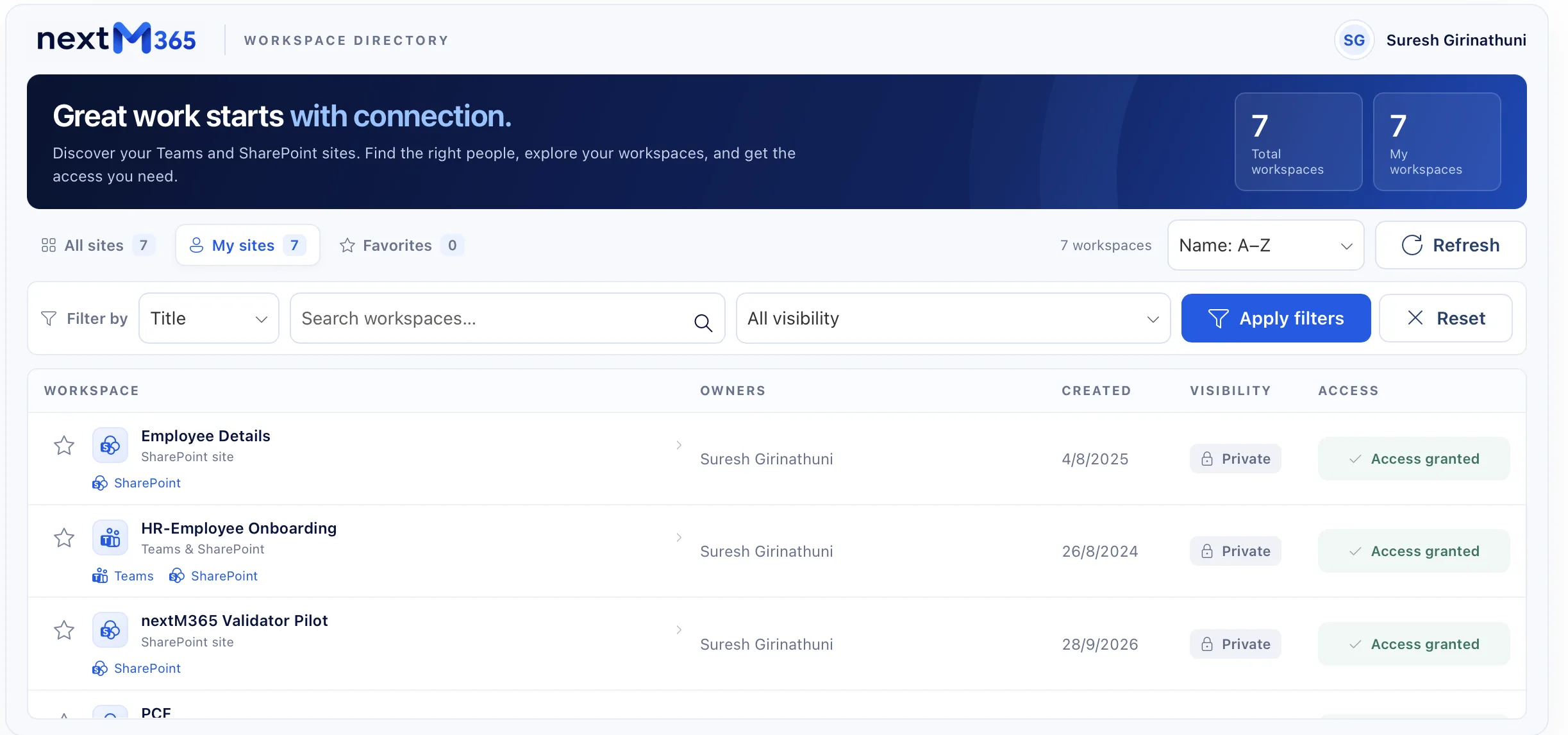
Browse Teams and SharePoint workspaces from one searchable place.
Switch between All sites, My sites, and Favorites for the work that matters now.
Narrow results by title, owner, creation date, and visibility.
Review available ownership, member, visibility, and creation information before acting.
Open the connected Teams or SharePoint workspace when you are ready to continue.
Send requests through the configured backend and optional Power Automate approval flow.
Keep frequently used workspaces close without implying cross-device synchronization.
Adapt the experience to your tenant, permissions, backend, and governance model.
TRY THE PRODUCT EXPERIENCE
Search, filter, open details, save favorites, and walk through the discovery flow.
Discover your Teams and SharePoint sites. Find the right people, explore your workspaces.
HOW IT WORKS
Bring Teams and SharePoint workspace discovery into one starting point.
Use the information people actually know: title, owner, date, and visibility.
Review the available context before contacting an owner or requesting access.
Follow the configured link or send a request through the configured process.
SECURITY AND ARCHITECTURE
The experience can sit alongside tenant configuration, permission controls, Microsoft Graph-backed data, and a configured backend for requests. Exact permissions, data sources, retention, and approval rules should be confirmed during evaluation.
WHO IT HELPS
Find the right Team or SharePoint site without asking around.
Reduce avoidable discovery questions with a shared starting point.
Make ownership and the next request easier to understand.
Create a clearer, more governed front door for workspace discovery.
A CLEAR DECISION
Best when people need to discover workspaces, owners, visibility, and the next configured action.
Best when someone already knows the workspace and is ready to work inside it.
Best for exceptions, incidents, and cases that need human investigation.
EVALUATE WITH CONFIDENCE
We can review your current directory, ownership model, access-request path, governance constraints, and rollout priorities before discussing an implementation shape.
FAQ
M365 Sites Center is a workspace directory experience for discovering Microsoft Teams and SharePoint sites, understanding ownership, and taking the next configured action.
No. It is a discovery and coordination layer that helps people find the right workspace before continuing in Microsoft 365.
Yes. The interface supports workspace records with Teams and SharePoint links where those connections are available.
No. Requests follow the configured backend and approval process; submission alone does not guarantee access.
The current experience stores favorites in the browser. Cross-device synchronization is not implied.
The showcased experience is designed to connect to a configured Microsoft 365 tenant and backend. Discovery and deployment scope should be confirmed during evaluation.
No. The product page demo is illustrative sample data and does not grant access or change a tenant.
Book a discovery conversation to review your workspace inventory, ownership model, request flow, permissions, and rollout needs.
NEXT STEP
See how M365 Sites Center could fit your people, permissions, and request process.
Talk through your use case →View the technical showcase