Microsoft Graph API Explained for Beginners
A beginner-friendly Microsoft Graph API guide explaining what Graph is, how requests work, permissions, tokens, endpoints, common use cases, and safe API design.
- Published
- Reading time
- 11 min read
Before you start
Is this guide for you?
- Best entry point
- Microsoft 365
- Time investment
- 11 min read
In this article
- What is Microsoft Graph API?
- Why Microsoft Graph matters
- How Microsoft Graph API works
- Microsoft Graph endpoint basics
- Requests and responses
On this page (25 sections)
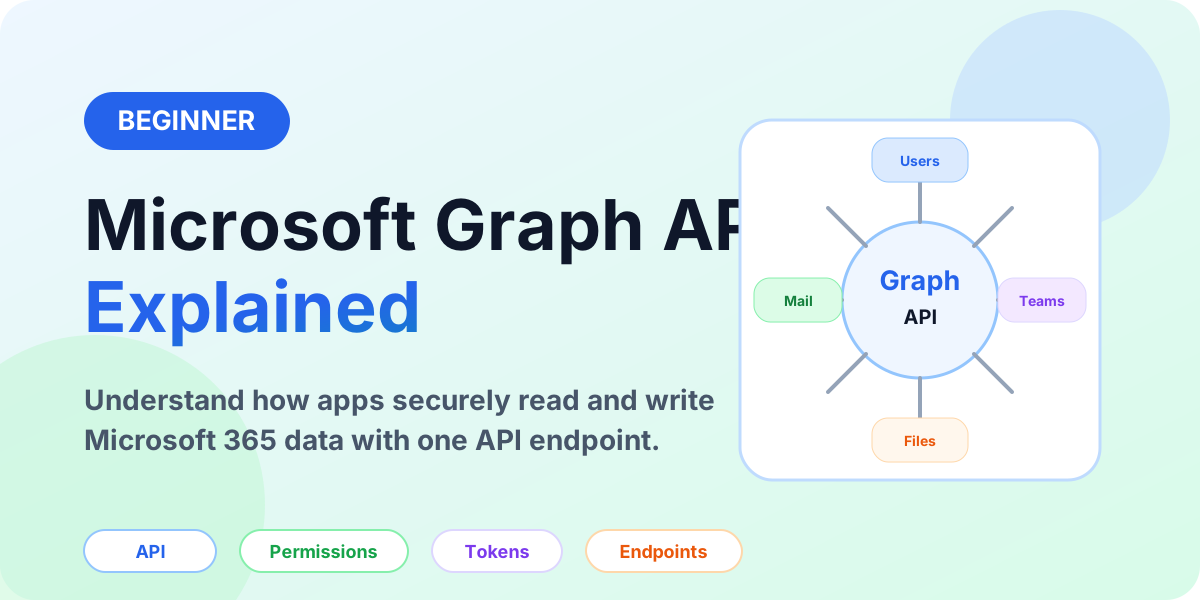
Microsoft Graph API is one of the most important developer and automation concepts in the Microsoft 365 ecosystem. It gives apps a consistent way to work with Microsoft cloud data such as users, groups, mail, calendar, Teams, SharePoint, OneDrive, security signals, and reports.
This beginner guide explains what Microsoft Graph is, why it matters, how requests work, what permissions mean, and how to think about Graph API integrations safely. If you are learning Microsoft 365 administration, Power Automate, Power Apps, Copilot Studio, or SharePoint development, Graph is a core concept worth understanding early.
If you are new to Microsoft 365 as a platform, start with What Is Microsoft 365?. If you are learning administration first, also read Microsoft 365 Admin Center Explained and Microsoft 365 Admin Roles Explained.
What is Microsoft Graph API?
Microsoft Graph API is a unified API that helps applications access Microsoft cloud resources through a common endpoint. Instead of learning a separate API pattern for every Microsoft 365 workload, developers can use Microsoft Graph as a central API surface.
In simple terms, Microsoft Graph is a controlled doorway into Microsoft 365 data. An app can request information or perform actions, but only when authentication, authorization, permissions, and policy allow it.
Microsoft Graph connects applications to Microsoft 365 data through secure API requests.
Why Microsoft Graph matters
Microsoft 365 is not only a set of user apps. It is also a cloud platform with users, groups, files, mailboxes, Teams, SharePoint sites, calendars, devices, reports, and security data. Organizations often need to build apps or automations that interact with this data.
Microsoft Graph matters because it gives a consistent way to build those integrations. A help desk tool can read user profile details. A reporting solution can collect usage data. A workflow can create or update information. A custom app can show files, calendar events, or team details.
- One API surface: Graph provides a common pattern across many Microsoft 365 services.
- Secure access: apps must authenticate and request the right permissions.
- Automation-friendly: Graph can support scripts, integrations, workflows, and custom apps.
- Microsoft 365-aware: Graph understands users, groups, mail, files, sites, teams, and more.
- Governance impact: permissions and consent must be reviewed carefully by administrators.
How Microsoft Graph API works
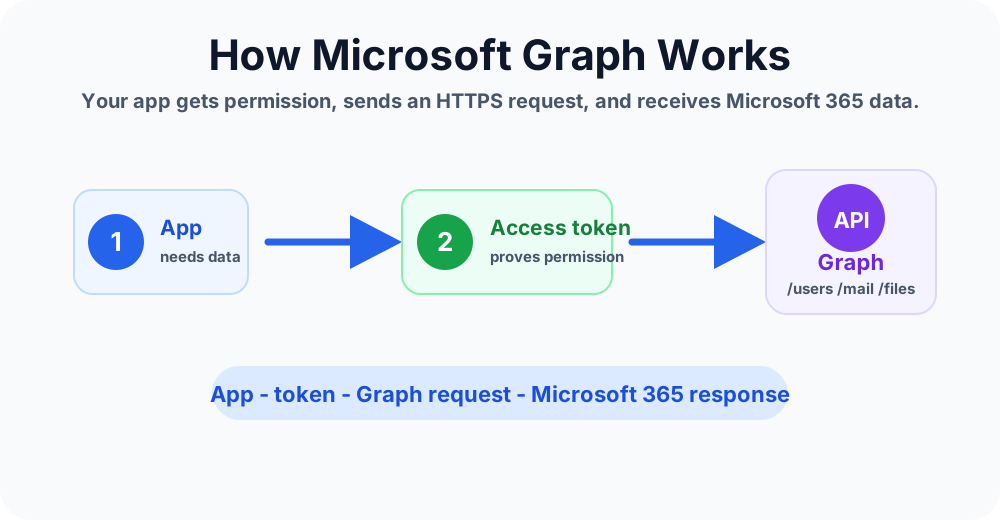
A Microsoft Graph request usually follows a simple pattern:
- An application needs Microsoft 365 data or wants to perform an action.
- The app authenticates through Microsoft identity.
- The app receives an access token for the allowed permissions.
- The app sends an HTTPS request to a Microsoft Graph endpoint.
- Microsoft Graph checks the token and permissions.
- Microsoft Graph returns data or performs the requested action if allowed.
The important point is that Graph is not a shortcut around security. It depends on identity, permissions, consent, roles, tenant settings, and Microsoft 365 policies.
Microsoft Graph endpoint basics
An endpoint is the API URL an app calls. Microsoft Graph endpoints represent resources such as users, groups, messages, drives, sites, calendars, or Teams.
Examples of common endpoint ideas include:
| Area | Example purpose | Beginner meaning |
|---|---|---|
| Users | Read profile or directory user details | Who is this user? |
| Groups | Read or manage Microsoft 365 groups | Which group owns this collaboration space? |
| Work with messages and mail folders | Read or send mail with permission. | |
| Calendar | Read or create calendar events | Schedule or display meetings. |
| Files | Access OneDrive or SharePoint files | Find or work with documents. |
| Teams | Work with teams, channels, or messages | Integrate with collaboration spaces. |
Beginners do not need to memorize every endpoint. It is more useful to understand the pattern: choose a resource, request permission, call the endpoint, handle the response.
Requests and responses
Microsoft Graph uses standard web API ideas. An app sends a request and receives a response. The request usually includes an HTTP method, endpoint URL, headers, and sometimes a request body.
- GET: read data, such as users or messages.
- POST: create something or run an action.
- PATCH: update part of an item.
- DELETE: remove an item when allowed.
The response usually includes a status code and data. For example, a successful read may return JSON data. A blocked request may return an error explaining that authentication, permission, throttling, or policy prevented the action.
Example Microsoft Graph requests
These examples show the shape of common Graph API calls. They are intentionally small so you can focus on the endpoint, method, and permission model.
GET https://graph.microsoft.com/v1.0/me
Authorization: Bearer <access-token>
Use /me for delegated scenarios where the signed-in user is the subject of the request.
GET https://graph.microsoft.com/v1.0/users?$select=displayName,mail,userPrincipalName
Authorization: Bearer <access-token>
Use /users when the app needs directory user data and has the right permissions.
POST https://graph.microsoft.com/v1.0/groups
Content-Type: application/json
Authorization: Bearer <access-token>

{
  "displayName": "Project Alpha",
  "mailEnabled": true,
  "mailNickname": "projectalpha",
  "securityEnabled": false,
  "groupTypes": ["Unified"]
}
Creating or updating resources requires stronger permission review than reading a small profile. Confirm the permission scope and admin consent before using write operations.
What are Microsoft Graph permissions?
Permissions are one of the most important Graph concepts. They define what an app can do. A permission might allow an app to read user profiles, read mail, manage groups, access files, or perform administrative actions.
There are two broad permission patterns beginners should understand:
| Permission type | How it works | Example |
|---|---|---|
| Delegated permission | The app acts with a signed-in user's context | A user signs in and the app reads that user's profile. |
| Application permission | The app acts without a signed-in user | A background service reads data it has been granted permission to access. |
Application permissions are often more sensitive because the app can act independently. Administrators should review them carefully and use least privilege.
What is an access token?
An access token is proof that the app has authenticated and has permission to call a resource. The app sends the token with the Graph request. Microsoft Graph validates the token before returning data or performing an action.
For beginners, think of the token as a temporary permission pass. It does not mean the app can do anything. It only supports the permissions, scope, user context, and policies that apply to that request.
App registration and consent
Before many apps can call Microsoft Graph, they need an app registration in Microsoft Entra. The registration identifies the app and controls settings such as redirect URLs, secrets or certificates, and requested API permissions.
Consent is the approval step for permissions. Some permissions can be consented by users in certain scenarios. Higher-risk permissions usually require administrator review or admin consent. This is why Microsoft Graph is both a developer topic and an administrator topic.
If you manage Microsoft 365 tenants, do not approve Graph permissions casually. Ask what the app needs, why it needs it, who owns the app, how data is protected, and whether a narrower permission is available.
Common Microsoft Graph errors
| Error pattern | Common meaning | What to check |
|---|---|---|
| 401 Unauthorized | The request is missing a valid access token | Token acquisition, audience, expiry, and Authorization header |
| 403 Forbidden | The app or user lacks permission | Delegated vs application permission, admin consent, user access, conditional access |
| 404 Not Found | The resource or endpoint was not found | Endpoint path, object ID, tenant, version, and whether the resource exists |
| 429 Too Many Requests | The caller is being throttled | Retry-After headers, batching, request volume, and backoff logic |
| 400 Bad Request | The request shape is invalid | JSON body, required fields, query parameters, and unsupported combinations |
Common Microsoft Graph API use cases
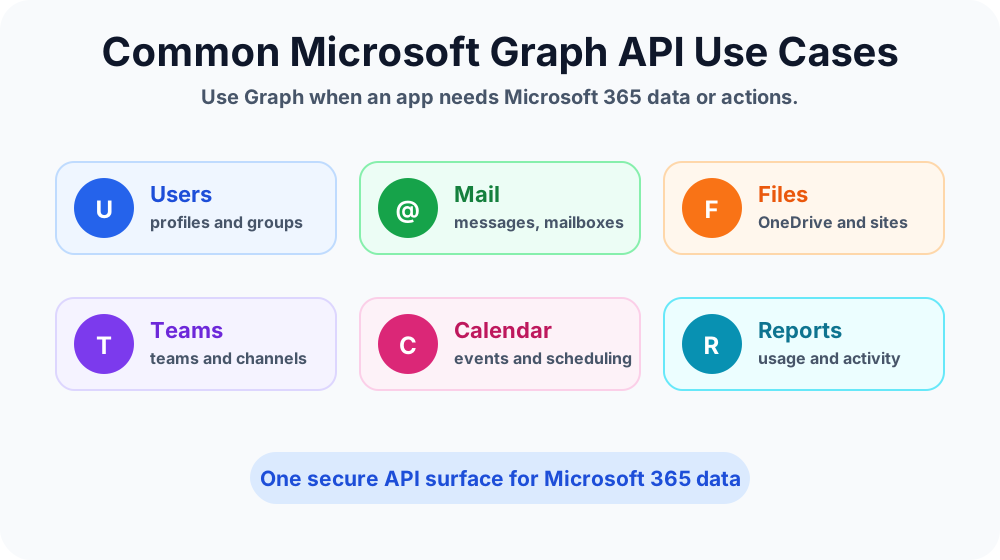
Graph is useful when an app, automation, or integration needs Microsoft 365 data or actions.
User and profile lookup
An app may need to display the current user's name, email, job title, manager, department, or profile details. Graph can support profile-aware apps when the right permissions are granted.
Mail and calendar automation
Graph can support mailbox and calendar scenarios such as reading messages, creating events, checking schedules, or integrating a business app with Outlook data. These scenarios must be designed carefully because mail and calendar data can be sensitive.
SharePoint and OneDrive files
Apps may need to find files, read metadata, upload content, or connect business processes to documents stored in SharePoint or OneDrive. For SharePoint fundamentals, read SharePoint Online Document Library Explained.
Teams integration
Graph can help apps work with Teams-related data, such as teams, channels, and selected collaboration scenarios. This is useful for support tools, onboarding flows, reporting, and collaboration dashboards.
Reporting and governance
Administrators and reporting teams may use Graph-based patterns to collect usage or directory information. This can support dashboards, lifecycle checks, license review, or governance reporting.
Microsoft Graph and Power Automate
Power Automate makers may meet Microsoft Graph when a built-in connector is not enough or when a process needs deeper Microsoft 365 integration. Graph can be called through approved technical patterns such as HTTP actions or custom connectors, depending on licensing, governance, authentication, and environment policy.
Before using Graph from a flow, confirm who owns the app registration, which permissions are granted, how secrets or certificates are protected, and whether a standard connector can meet the requirement more safely. If you are learning Power Automate basics first, read Power Automate Cloud Flows Explained.
Microsoft Graph and Copilot Studio
Copilot Studio agents often need to retrieve information or complete tasks in business systems. In some scenarios, an action, connector, flow, or API layer may use Microsoft Graph to get Microsoft 365 data. The agent itself should be designed with clear user intent, careful permissions, and predictable responses.
For agent action design, read Call an Action Node Explained. For storing values before calling an action, read Variable Node Explained.
Beginner example: Employee profile lookup
Imagine an internal app that shows a signed-in user's profile summary. The app may need to read the user's display name, email address, job title, and department.
- The user opens the app and signs in.
- The app requests permission to read basic profile details.
- The app receives an access token.
- The app calls a Graph endpoint for the signed-in user.
- Graph returns profile data allowed by the token and tenant settings.
- The app displays the profile summary.
This is a simple example because the app reads a small amount of profile data. More sensitive data, administrative actions, or background access requires stronger review.
Beginner example: Support ticket enrichment
An IT help desk solution may create tickets from user requests. To reduce manual typing, the system may look up the user's department, manager, office location, or license details. Microsoft Graph can support this type of enrichment when the right permissions and governance are in place.
The important design rule is to collect and use only what is required. A support ticket does not need broad access to every mailbox or every file unless there is a clearly approved business reason.
Security best practices for Microsoft Graph
- Use least privilege. Grant only the permissions the app truly needs.
- Prefer narrow scopes. Avoid broad tenant-wide permissions when a smaller permission works.
- Review admin consent. High-impact permissions should be reviewed by the right administrator.
- Protect secrets and certificates. Do not store app secrets in scripts, documents, or unmanaged locations.
- Document ownership. Every app registration should have a business owner and technical owner.
- Monitor usage. Review sign-ins, app activity, and permission changes where available.
- Remove unused apps. Retire old app registrations and permissions that are no longer needed.
Common mistakes to avoid
- Approving broad permissions too quickly: understand what the app can access before consenting.
- Confusing delegated and application permissions: app-only access can have a wider impact.
- Hard-coding secrets: secrets need secure storage and rotation planning.
- Ignoring throttling and errors: production apps should handle failed requests and retries carefully.
- Using Graph when a standard connector is enough: simpler supported connectors may be easier to govern.
- No ownership record: every integration needs a responsible owner.
Microsoft Graph learning checklist
If you are a beginner, learn Microsoft Graph in this order:
- Understand what resource you want: user, mail, file, group, site, team, or calendar.
- Learn whether the action is read, create, update, or delete.
- Identify the endpoint pattern.
- Understand whether the app needs delegated or application permissions.
- Check whether admin consent is required.
- Test with a safe sample scenario before touching production data.
- Document the permission, owner, purpose, and support process.
When should you use Microsoft Graph?
Use Microsoft Graph when you need a custom app, script, flow, or integration to work with Microsoft 365 data in a controlled way. Graph is especially useful when standard user interfaces or basic connectors cannot meet the requirement.
Do not use Graph just because it is powerful. Use it when the business requirement is clear, the permission model is understood, and the support team can maintain the integration.
Key takeaways
- Microsoft Graph API is a unified API for Microsoft 365 data and services.
- Graph requests depend on authentication, permissions, tokens, and tenant policy.
- Delegated permissions use a signed-in user context; application permissions can run without a user.
- Administrators should review permissions carefully before granting consent.
- Graph is useful for apps, automation, reporting, Teams, SharePoint, mail, calendar, and user profile scenarios.
Microsoft Graph is a powerful part of Microsoft 365 development and automation. Learn the basics first: endpoint, permission, token, request, response, and governance. Once those concepts are clear, Microsoft Graph becomes much easier to understand and safer to use.
Tagged
Microsoft Graph · Permissions · Security · Connectors · Governance
Frequently asked questions
What is Microsoft Graph API?
Microsoft Graph API is a unified API surface for accessing Microsoft cloud data and services such as users, groups, mail, calendar, files, Teams, SharePoint, and reports, depending on permissions and licensing.
Is Microsoft Graph only for developers?
Microsoft Graph is mainly used by developers and automation builders, but administrators and makers should understand the basics because many apps, scripts, flows, and integrations rely on Graph permissions and access tokens.
What is a Microsoft Graph endpoint?
A Microsoft Graph endpoint is a URL that represents a resource or action, such as users, messages, groups, sites, drives, or Teams. Apps call these endpoints using HTTPS requests.
What are Microsoft Graph permissions?
Microsoft Graph permissions define what an app is allowed to read or change. Permissions can be delegated for signed-in user access or application permissions for app-only access.
What is an access token in Microsoft Graph?
An access token is a security token that proves the app has been authenticated and has permission to call Microsoft Graph for a specific scope or permission set.
Can Power Automate use Microsoft Graph API?
Power Automate can call Microsoft Graph through approved connectors, HTTP actions, custom connectors, or other integration patterns when the environment, licensing, authentication, and permissions allow it.
Sources
- Microsoft Learn: Overview, Microsoft
- Microsoft Learn: Introduction, Microsoft
Have a Microsoft 365 topic idea?
Share article suggestions, community session ideas, corrections, or real-world scenarios for future nextM365 learning notes.
Keep learning Microsoft 365
Explore more practical guides for SharePoint, Power Platform, Copilot Studio, migration, automation, governance, and security.
Continue learning
Related tutorials
Related questions
Next action