Conversation Variables Deep Dive | Copilot Studio Day 30
Learn what conversation variables are in Microsoft Copilot Studio, how they work during a chat session, and when to use them instead of topic or bot variables.
- Published
- Reading time
- 7 min read
Week 5 · Day 30 of 365 in 365 Days of Copilot Studio — view the full series
Before you start
Is this guide for you?
- Best entry point
- 365 Days of Copilot Studio
- Time investment
- 7 min read
In this article
- What are conversation variables in Copilot Studio?
- Why conversation variables matter
- Conversation variables vs topic variables vs bot variables
- How conversation variables work
- Common conversation variable use cases
On this page (19 sections)
Conversation variables in Microsoft Copilot Studio help an agent remember values during the current chat session. They are useful when a value should stay available while the user moves through messages, conditions, actions, redirects, and related topics in the same conversation.
Day 30 of the 365 Days of Microsoft Copilot Studio series takes a deeper look at conversation variables: what they are, how they differ from topic variables and bot variables, where they help, and how to design them safely.
This lesson builds on Day 16: Question Node Explained, Day 18: Variable Node Explained, Day 28: Topic Variables Explained, and Day 29: Bot Variables Explained.
What are conversation variables in Copilot Studio?
A conversation variable stores a value that should be available during the active conversation. It gives the agent short-term memory for the current chat, so later nodes can reuse information that the user already provided.
For example, a user may say they need help with a laptop issue. The agent can store the request category during the conversation and reuse it later when routing the user, creating a ticket, confirming details, or summarizing the outcome.
In simple words: conversation variable = memory for the current chat session.
Why conversation variables matter
Good conversations should feel connected. If a user already gave a value, the agent should not ask again unless confirmation is needed. Conversation variables help keep the chat coherent without making every value global.
- Better continuity: reuse values while the user is still in the same conversation.
- Cleaner routing: send users to the right topic or path based on a value already collected.
- Action support: pass values to flows, connectors, and APIs.
- Better confirmations: show collected values back before submission.
- Less repetition: avoid asking the same question more than once in one chat.
Conversation variables vs topic variables vs bot variables
The main difference is scope. Scope means where the value should be available and how long it should be useful.
| Variable type | Best use | Example |
|---|---|---|
| Topic variable | Use inside one topic | LeaveDays in a leave request topic |
| Conversation variable | Use during the current chat session | RequestType reused after a redirect or confirmation |
| Bot variable | Use across broader agent context | UserDepartment reused across many topics |
A practical rule: use the narrowest scope that solves the requirement. If the value belongs only to one topic, keep it as a topic variable. If it should travel during the current chat, use a conversation variable. If it should be reused across broader agent context, consider a bot variable.
How conversation variables work
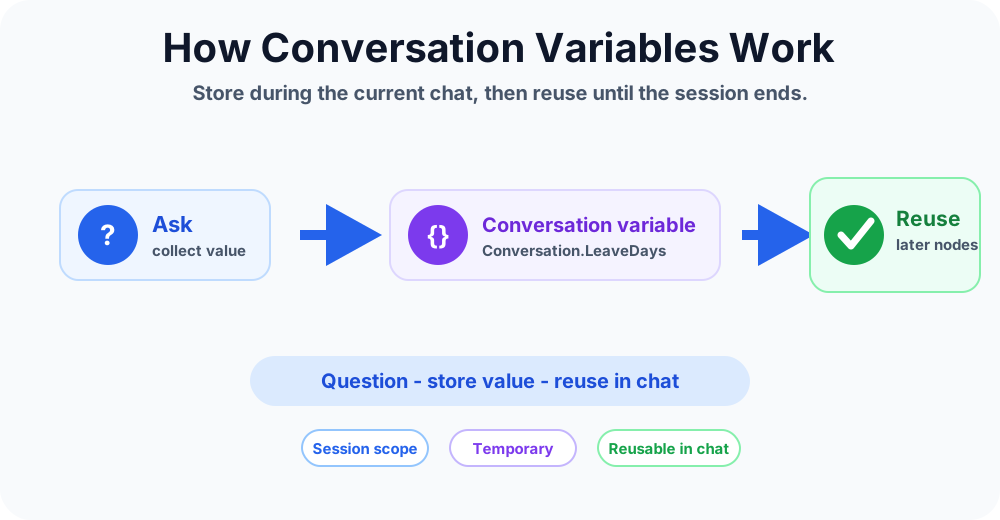
The pattern is simple:
- The agent collects or receives a value.
- The value is stored as a conversation variable.
- Later nodes read the variable.
- The variable controls a message, condition, redirect, or action input.
- The value remains useful during the active conversation context.
Example:
- User says: I need a new laptop charger.
- Agent stores: Conversation.RequestType = Hardware.
- Condition checks the request type.
- Agent routes to the hardware support path.
- Action creates a ticket using the stored request type.
Common conversation variable use cases
Conversation variables are useful when a value is temporary but still important during the current chat.
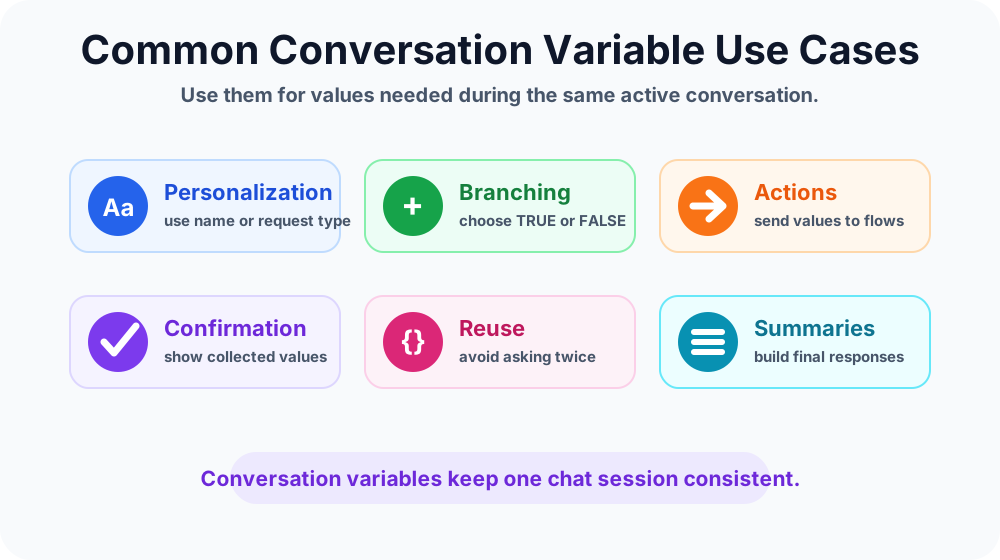
Personalization inside one chat
The agent can reuse a user's name, request type, location, or selected option during the current conversation. This makes responses feel more connected without storing the value as broad context.
Branching and conditions
Conversation variables often control logic. For example, a support topic may store IssueType and then branch to password reset, device issue, app access, or ticket creation paths.
Action inputs
Actions usually need inputs. A conversation variable can store values such as employee ID, ticket category, approval amount, email address, or selected service, then pass them to an action.
Confirmations
Before running an action, the agent can show stored values back to the user. This helps catch mistakes before creating a ticket, submitting a request, or sending data to another system.
Summaries and final responses
At the end of a topic, conversation variables can help build a summary: what the user requested, what values were submitted, and what happens next.
Example: IT support request
Imagine an IT support agent that helps users create service tickets. The topic collects the issue type, device name, urgency, and preferred contact method. These values are useful during the current conversation but may not need to become broad bot context.
| Conversation variable | Value example | Used for |
|---|---|---|
| Conversation.IssueType | Hardware | Route to the right support path |
| Conversation.DeviceName | Laptop | Add detail to the ticket |
| Conversation.Urgency | High | Set priority |
| Conversation.ContactMethod | Teams | Follow-up preference |
After the ticket is created, the final message can reuse these values: Your high-priority hardware ticket for laptop support was created. IT will contact you in Teams.
Example: HR leave request
In an HR leave topic, the agent may collect leave type, start date, end date, number of days, and manager approval requirement. Some values may only be needed inside the topic. Others may be needed after a redirect or action.
If the conversation redirects to a policy explanation topic and then returns to the leave request, conversation variables can help preserve the current request context.
- Conversation.LeaveType: annual leave, sick leave, or unpaid leave.
- Conversation.LeaveDays: number of days requested.
- Conversation.RequiresApproval: TRUE or FALSE path for routing.
- Conversation.PolicyChecked: whether the user reviewed the policy before submission.
When not to use conversation variables
Conversation variables are useful, but they should not become a dumping ground for every value.
- Do not use them for values needed only inside one simple topic.
- Do not use them for permanent user preferences unless broader context is intended.
- Do not store sensitive information unless the scenario clearly requires it.
- Do not reuse old values without checking whether they are still correct.
- Do not hide important values from the user before running an action.
Naming best practices
Clear names make conversation logic easier to maintain. Avoid generic names such as value, answer, or input.
Better examples:
- Conversation.RequestType
- Conversation.EmployeeID
- Conversation.LeaveDays
- Conversation.TicketPriority
- Conversation.SelectedSystem
A good variable name should tell another maker what the value means and why it exists.
Best practices for conversation variables
- Choose the right scope. Use conversation variables for values needed during the active chat.
- Keep names specific. Names should describe the business meaning.
- Handle blank values. Add fallback logic when a value was not collected.
- Confirm before actions. Show important values before submitting to another system.
- Keep sensitive data limited. Store only what the task requires.
- Reset or replace values when needed. Do not let old values control new decisions.
- Test redirects and actions. Make sure the variable is still available where it is needed.
Common mistakes to avoid
- Using broad scope too early: if one topic is enough, do not make the value wider.
- Missing fallback paths: blank variables can break conditions and action inputs.
- Vague variable names: unclear names make future troubleshooting harder.
- Reusing stale values: ask or confirm again when context may have changed.
- Skipping confirmation: users should see important request details before submission.
- Passing the wrong value to actions: always test action inputs with realistic data.
Testing checklist
Conversation variables need testing across paths, not only on the happy path.
- Test the first path that sets the variable.
- Test a path where the user skips or changes the answer.
- Test every condition that reads the variable.
- Test every action that receives the variable.
- Test redirects to make sure context is preserved.
- Test final messages to ensure summaries show the right values.
- Test what happens when the value is blank or unexpected.
How conversation variables improve agent design
Conversation variables help make the active chat feel like one connected experience. They reduce repeated questions, support smarter branching, and help actions receive the right inputs.
The key is discipline. Use the right variable scope, name values clearly, and test how they behave across messages, conditions, redirects, and actions.
Key takeaways
- Conversation variables store values during the current chat session.
- They are useful for routing, confirmation, action inputs, and summaries.
- They sit between topic variables and bot variables in scope.
- Use clear names and avoid storing unnecessary sensitive data.
- Always test blank, changed, redirected, and action-driven paths.
Conversation variables are a practical way to keep Copilot Studio conversations connected without making every value global. Use them when a value should stay useful during the current chat, then design clear fallbacks and confirmations so the agent remains predictable.
Next in the series: Day 31.
Tagged
Variables · Conversation Design · Topics · Conditions · Actions
Frequently asked questions
What are conversation variables in Microsoft Copilot Studio?
Conversation variables store values during an active conversation so the agent can reuse those values across messages, conditions, actions, and topic handoffs while the chat session is still in context.
How are conversation variables different from topic variables?
Topic variables are usually scoped to one topic. Conversation variables are useful when a value needs to stay available during the wider active chat experience, especially when the conversation moves between topics.
How are conversation variables different from bot variables?
Bot variables are broader reusable agent context. Conversation variables are better for values that should live only during the current conversation session and should not become permanent or global context.
When should I use a conversation variable?
Use a conversation variable when the value is needed beyond one node or topic during the same chat, such as a selected request type, confirmation value, routing choice, or temporary action input.
Can conversation variables be used in actions?
Yes. Conversation variables can provide inputs to actions such as Power Automate flows, connector actions, or API calls when the stored value is needed to complete the task.
What is a best practice for conversation variables?
Use clear names, keep the scope temporary, handle blank or stale values, confirm important details before actions, and avoid storing sensitive data unless the scenario requires it.
Sources
- Microsoft Learn: Authoring Create Edit Topics, Microsoft
- Microsoft Learn: Microsoft Copilot Studio, Microsoft
Have a Microsoft 365 topic idea?
Share article suggestions, community session ideas, corrections, or real-world scenarios for future nextM365 learning notes.
Keep learning Microsoft 365
Explore more practical guides for SharePoint, Power Platform, Copilot Studio, migration, automation, governance, and security.
Continue learning
Related tutorials
Related questions
Related comparisons
Next action