Version Management | Copilot Studio Day 45
Learn how version management keeps Copilot Studio agents reliable, including draft versus published versions, testing, tracking changes, solutions, export and import, backups, environments, mistakes, and best practices.
- Published
- Reading time
- 8 min read

Week 7 · Day 45 of 365 in 365 Days of Copilot Studio — view the full series
Before you start
Is this guide for you?
- Best entry point
- 365 Days of Copilot Studio
- Time investment
- 8 min read
In this article
- What Is Version Management?
- Draft Version vs Published Version
- What Happens When You Make Changes?
- Why Version Management Matters
- Test Changes Before Publishing
On this page (15 sections)
Day 45 of 365 Days of Copilot Studio focuses on version management. Once your copilot is being tested, published, and improved, you need a clear way to track what changed, who changed it, why it changed, and which version users are actually using.
Version management keeps Copilot Studio solutions reliable. It helps makers work safely in draft, test changes before release, publish only stable updates, move solutions across environments, and recover when something goes wrong.
This lesson builds directly on Day 41: Testing Your Copilot, Day 42: Debugging Conversations, Day 43: Conversation Analytics, and Day 44: Publishing Your Copilot.
What Is Version Management?
Version management is the discipline of controlling change over time. In Copilot Studio, it means knowing which topics, actions, knowledge sources, settings, variables, permissions, and published channels belong to a specific release.
A simple copilot may start with one maker and a few topics. But as soon as the copilot becomes useful, more changes appear: new topics, updated trigger phrases, revised knowledge, action changes, permission updates, and channel configuration. Without version management, teams lose confidence in what is live.
Good version management helps you:
- Track changes: understand what was added, updated, removed, and approved.
- Control releases: publish only when a tested version is ready.
- Rollback when needed: recover faster when a release causes problems.
- Maintain stability: keep the user experience predictable as the copilot grows.
Draft Version vs Published Version
The draft version is for building and testing. Makers use the draft to edit topics, adjust messages, update instructions, connect actions, test flows, and experiment with improvements. Draft changes should be treated as work in progress.
The published version is for users and real-world use. It is the version available through selected channels such as Microsoft Teams, a website, or another configured channel. Users should only receive changes that have been tested and approved.
| Area | Draft version | Published version |
|---|---|---|
| Purpose | Build, test, and refine changes | Serve real users in selected channels |
| Audience | Makers, testers, and reviewers | End users and pilot groups |
| Risk level | Safe place to experiment | Must be stable and supportable |
| Change visibility | Visible before publishing only to makers or testers | Reflects the latest published changes |
Rule of thumb: make changes in draft. Publish only when the version is ready for users.
What Happens When You Make Changes?
Every change affects the copilot solution. A topic update can change routing. A prompt change can affect answer tone. A connector update can break an action. A permission change can expose or block data. Version management gives those changes a controlled path.
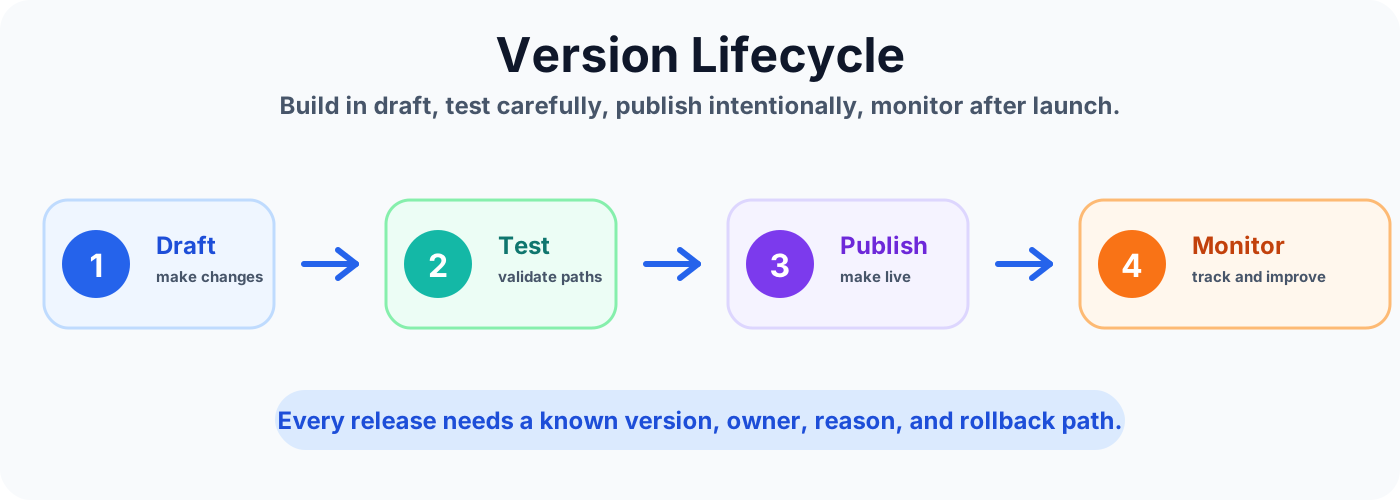
- You make changes: edit topics, actions, settings, messages, instructions, or knowledge.
- Changes are saved as draft: the live user experience does not automatically change.
- You test and validate: confirm the updated behavior works before release.
- You publish a new version: the tested release becomes active.
- Users see the latest published version: end users interact with the stable release, not the draft.
Why Version Management Matters
Good version management keeps Copilot Studio agents safe, stable, and scalable. It gives teams confidence that improvements are controlled instead of accidental.
- Reduce risk: prevent untested changes from affecting end users.
- Enable easier rollback: return to a known good state when something breaks.
- Improve quality: test and validate changes before release.
- Support collaboration: help teams work together with clear version boundaries.
- Support growth: scale the copilot lifecycle as more makers, topics, and environments are added.
Test Changes Before Publishing
Testing is the release gate. Before a new version goes live, test the draft as if you were a real user. A small topic change can create unexpected results if it affects routing, variables, authentication, or action inputs.
At minimum, test these areas:
- Conversations: check responses, topic routing, fallback behavior, and conversation flow.
- Actions: verify connections, inputs, outputs, errors, and returned messages.
- Permissions: confirm users can access only what they should access.
- Edge cases: test missing data, unexpected input, unclear wording, and error paths.
- User experience: validate clarity, tone, completion, and ease of use.
For a deeper testing routine, use the checklist from Day 41. For issue investigation, use the debugging process from Day 42.
Publish a New Version
Publishing makes tested changes live for users. Treat publishing as a release decision, not a routine save action. Before clicking publish, confirm the change reason, testing result, owner, audience, support path, and rollback plan.
A practical publishing flow looks like this:
- Review: confirm what changed and why.
- Test: verify topics, actions, permissions, and edge cases.
- Publish: release the new version only when it is stable.
- Validate live: test the published channel as a real user.
- Monitor: watch analytics, feedback, fallback, and action failures.
Track What Changed
Tracking is what turns publishing into a managed release process. If a user reports a problem, you should be able to identify which version introduced the change and what part of the copilot was modified.
Track these change areas:
- Topics and conversations: new, updated, or removed topics.
- Actions and connections: changes in flows, plugins, connectors, APIs, or data connections.
- Permissions and roles: updates to access, authentication, or security settings.
- Settings and variables: configuration changes and variable behavior changes.
- Who and when: who made the change, when it happened, and why it was approved.
A simple release note is often enough for smaller copilots. Include the version name, release date, owner, summary, test result, known issues, and rollback notes.
Use Solutions for Version Control
In the Power Platform, solutions help package related components so they can be moved, tracked, and managed together. For Copilot Studio projects, using solutions gives the team a cleaner lifecycle than making unmanaged changes directly in production.
Solutions help you:
- Package changes: group your copilot and related components.
- Move across environments: export and import between development, test, and production.
- Maintain version history: track solution versions over time.
- Release safely: reduce risk with controlled updates and rollback planning.
- Collaborate: help teams work with a shared release structure.
Development, Test, and Production
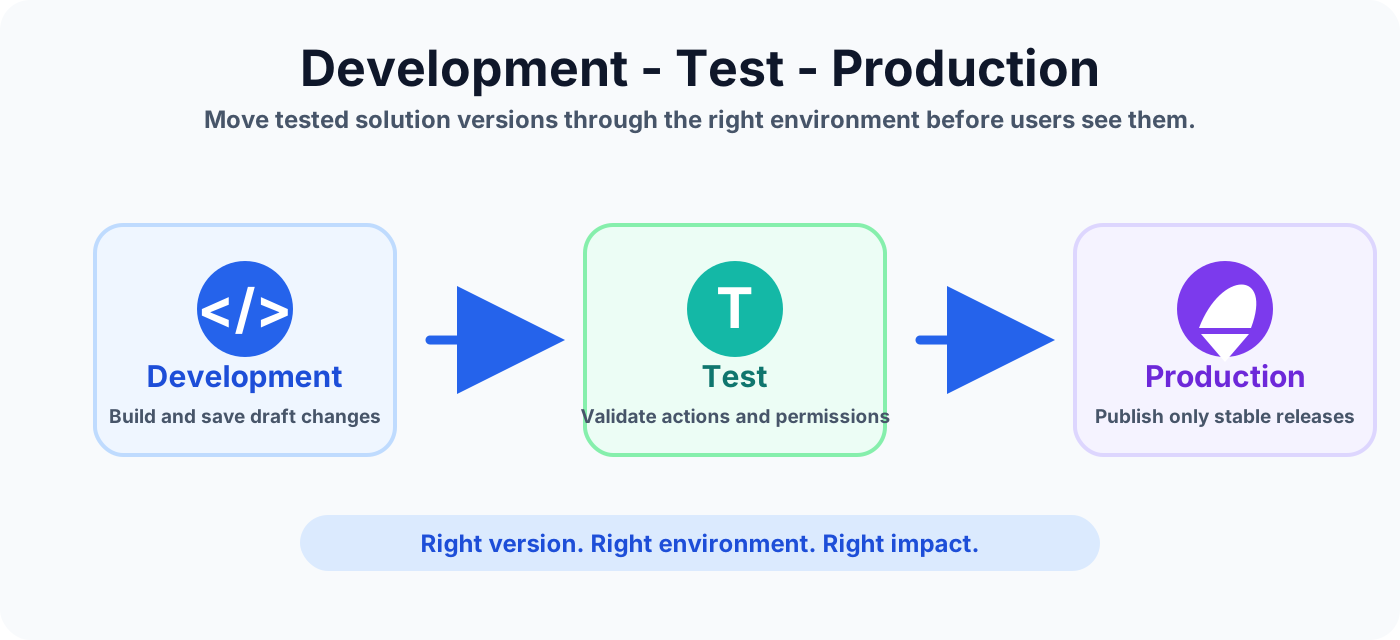
As Copilot Studio usage grows, separate environments become important. Development is where makers build and change. Test is where changes are validated safely. Production is where real users depend on the copilot.
| Environment | Purpose | Release rule |
|---|---|---|
| Development | Build your copilot, make changes, and save as draft. | Frequent changes are expected. |
| Test | Validate conversations, actions, permissions, and edge cases. | No release until tests pass. |
| Production | Serve real users through selected channels. | Only stable and approved versions belong here. |
Export and Import Your Copilot
Export and import help you move a Copilot Studio solution across environments with more control. The goal is not only portability. The goal is consistency: the right package moves to the right target environment after review.
- Prepare: make sure the copilot and related components are ready to move.
- Export: export the copilot as part of a solution package.
- Transfer: move the package to the target environment.
- Import: import the solution into the target environment.
- Validate: test again after import because connections, permissions, and environment variables can differ.
Back Up Before Major Changes
A backup today can save you from production problems tomorrow. Before major changes, keep a known safe copy of the copilot and its solution components. Backups are especially important before large topic restructuring, new actions, environment moves, and broad sharing.
Back up when you are about to:
- Make major updates.
- Add new features or actions.
- Change environments or solution packaging.
- Share the copilot with a larger audience.
Common Version Management Mistakes
| Mistake | Why it hurts | Better practice |
|---|---|---|
| No backups | A bad change is harder to recover from. | Back up before major changes. |
| Skipping testing | Users discover broken conversations or actions first. | Test in the right environment before publishing. |
| Poor naming | Unclear version names create confusion. | Use a clear naming convention such as v1.2 - Bug Fix. |
| No change tracking | Problems are harder to investigate and fix. | Keep release notes and change logs. |
| Wrong environment | Publishing to the wrong place can disrupt users. | Publish to the correct test or production environment. |
Version Management Best Practices
- Back up regularly: always keep a safe copy before making major changes.
- Use clear naming: follow a simple convention for version names and release notes.
- Test before publishing: validate in the right environment before releasing.
- Track changes: keep a log of what changed, who changed it, and why.
- Control access: limit publishing permissions to authorized users.
- Review regularly: clean up old versions when they are no longer needed.
- Notify your team: communicate meaningful releases, fixes, and behavior changes.
- Use the right environment: develop, test, and publish in the proper place.
- Maintain security: keep security settings consistent across versions.
- Document everything: write enough detail for future audits and troubleshooting.
Simple Release Checklist
- Name the version clearly.
- Record the business reason for the change.
- Back up the current stable version.
- Test conversations, actions, permissions, and edge cases.
- Confirm the target environment and channel.
- Publish the tested version.
- Validate the live experience.
- Monitor analytics and user feedback.
- Document any known issues and rollback plan.
Key Takeaway
Effective version management keeps your Copilot Studio solutions reliable, secure, and easy to manage. Plan your versions before making changes, publish and track every version carefully, collaborate in the right environment with the right access, monitor after release, and protect your work with backups.
Good version management today means fewer issues and better results tomorrow.
Tagged
ALM · Governance · Actions · Security · AI Agents
Frequently asked questions
What is version management in Microsoft Copilot Studio?
Version management is the practice of tracking changes, testing updates, publishing stable releases, maintaining backups, and controlling how Copilot Studio agents move through environments.
What is the difference between a draft and published version?
The draft version is where makers build, edit, and test changes. The published version is the stable version users access through selected channels.
Should I test Copilot Studio changes before publishing?
Yes. Test conversations, actions, permissions, edge cases, and user experience before publishing so broken changes do not affect end users.
Why use solutions for Copilot Studio version control?
Solutions help package related components, move them between environments, track solution versions, support controlled rollbacks, and improve collaboration.
When should I back up a Copilot Studio agent?
Back up before major updates, before adding new features, before environment changes, and before sharing or publishing important releases.
Sources
Have a Microsoft 365 topic idea?
Share article suggestions, community session ideas, corrections, or real-world scenarios for future nextM365 learning notes.
Keep learning Microsoft 365
Explore more practical guides for SharePoint, Power Platform, Copilot Studio, migration, automation, governance, and security.
Continue learning
Related tutorials
Related questions
Related comparisons
Next action