Conversation Analytics | Copilot Studio Day 43
Learn how to use Copilot Studio conversation analytics to measure usage, engagement, topic performance, resolution outcomes, escalations, fallback trends, feedback, and improvement patterns.
- Published
- Reading time
- 8 min read

Week 7 · Day 43 of 365 in 365 Days of Copilot Studio — view the full series
Before you start
Is this guide for you?
- Best entry point
- 365 Days of Copilot Studio
- Time investment
- 8 min read
In this article
- What is conversation analytics?
- Why analytics matters
- Start with the analytics dashboard
- Monitor conversation volume
- Track engagement
On this page (16 sections)
Day 43 of 365 Days of Copilot Studio explains how conversation analytics help you measure whether your copilot is actually useful after users start using it.
Publishing a copilot is not the finish line. Once real users interact with it, you need to understand what they ask, where they get stuck, which topics work, which actions fail, when users escalate, and whether the experience is improving over time. Conversation analytics turn those signals into evidence.
Analytics are especially important after the testing and debugging work covered in Day 41 and Day 42. Testing tells you whether expected paths work before launch. Debugging tells you why a known conversation fails. Analytics tells you what is happening across many real conversations after launch.
What is conversation analytics?
Conversation analytics is the practice of reviewing usage, outcomes, engagement, topic performance, fallback behavior, escalation patterns, user feedback, and trends so you can improve the copilot based on real evidence.
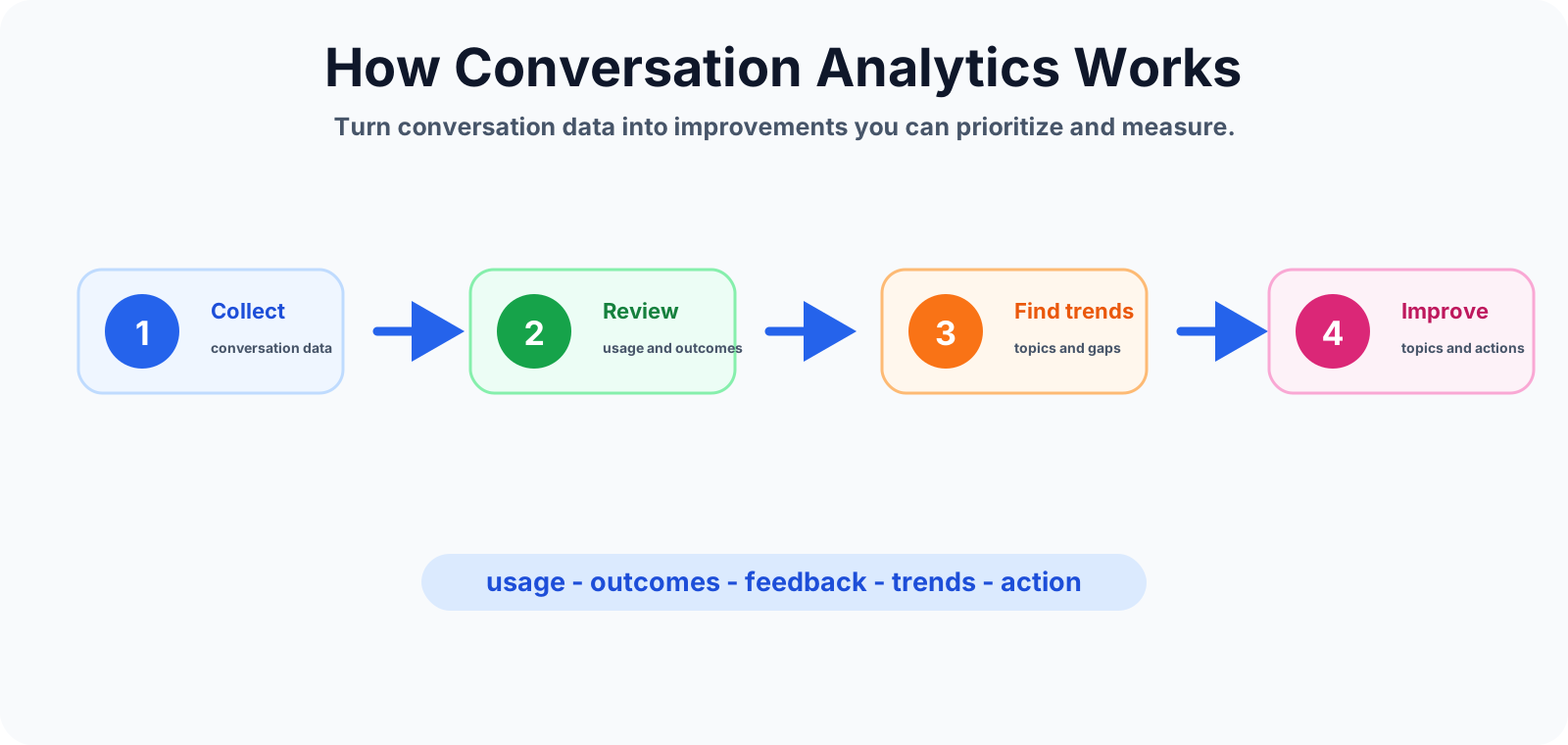
A useful analytics process follows a simple loop: collect conversation data, review usage and outcomes, find trends, and turn those trends into backlog improvements.
Why analytics matters
A copilot can look complete in the authoring canvas but still fail with real users. Users phrase requests differently than makers expect. They ask partial questions. They mix topics. They skip details. They request unsupported actions. They trigger fallback paths that were not tested enough.
Analytics helps you move from opinions to evidence. Instead of asking whether the copilot feels good, you can ask stronger operational questions:
- Are users using the copilot regularly?
- Which topics receive the most traffic?
- Which topics have weak outcomes?
- Where do users abandon the conversation?
- Which fallback phrases appear repeatedly?
- Which issues still require human support?
- Are improvements reducing failures over time?
Start with the analytics dashboard
The analytics dashboard should be your first review point after launch. Do not begin by changing topics randomly. Look at the signals first, then decide what needs attention.
At minimum, review these areas:
- Usage: how many conversations started and how usage changes over time.
- Outcomes: whether conversations are completed, abandoned, escalated, or unresolved.
- Engagement: how many users interact, how often they return, and how long conversations take.
- Trends: repeated patterns in topics, phrases, fallback, escalation, and feedback.
A dashboard is only useful when it leads to action. A clean chart with no improvement process does not help users.
Monitor conversation volume
Conversation volume tells you whether users are reaching and trying the copilot. A sudden increase may mean adoption is improving, a new business process is sending traffic to the agent, or a real operational problem is creating demand.
But volume is not the same as success. More conversations can mean strong engagement, or it can mean users are repeatedly trying to solve the same problem because the copilot is not resolving it. Pair volume with resolution, fallback, escalation, and feedback metrics before you declare the experience healthy.
Track engagement
Engagement analytics help you understand whether users interact and stay engaged. Review active users, returning users, time spent, messages per session, and drop-off points.
If users start conversations but leave quickly, the greeting, topic routing, or first question may be weak. If conversations are long but outcomes are poor, the topic may be asking too many questions, looping, or failing near an action. If returning usage grows while escalation drops, the copilot may be gaining trust.
Analyze topic performance
Topic performance shows which topics are used most and which need improvement. A high-use topic deserves extra care because small improvements can affect many users. A low-use topic may have poor discovery, weak trigger phrases, unclear naming, or limited business value.
For each important topic, review:
- Usage count and trend over time.
- Successful completion rate.
- Fallbacks inside or after the topic.
- Escalation rate from the topic.
- Action failures or missing input errors.
- User feedback and common complaint patterns.
This is where analytics connects directly to design. If a password reset topic has high traffic and many escalations, inspect the trigger phrases, variables, authentication assumptions, action reliability, and ending messages.
Review resolution and outcomes
Resolution analytics answer the most important business question: did the copilot help the user solve the problem?
Track successful outcomes, unresolved outcomes, abandoned conversations, and escalations. A high resolution rate usually means the copilot is handling expected work. A high unresolved rate means users are asking for things the copilot cannot answer, the conversation is confusing, or the connected process is failing.
Do not optimize only for fewer escalations. Some escalations are correct. Sensitive HR issues, finance exceptions, security incidents, legal approvals, and complex support problems may need a human path. The goal is not to hide escalation. The goal is to escalate the right cases with useful context.
Watch escalation trends
Escalation trends tell you where automation is reaching its limit. If escalation rises sharply for one topic, treat it as a signal. It may reveal missing knowledge, weak routing, unclear questions, failed integrations, or a business process that needs human ownership.
Useful escalation review questions include:
- Which topics escalate most often?
- Which user phrases appear before escalation?
- Does the handoff include enough conversation context?
- Are users escalating because they are confused or because the issue truly needs a person?
- Did recent topic changes reduce or increase escalation?
Analyze fallback trends
Fallback analytics show where the copilot does not understand the user. This is one of the fastest ways to improve topic discovery and user experience.
A high fallback rate may mean trigger phrases are too narrow, users are asking unsupported questions, knowledge sources are incomplete, or the copilot needs a better routing topic. Repeated fallback can also expose conversation loops, which should be debugged using the process from Day 42.
When reviewing fallback trends, group user phrases by intent. Do not fix each phrase one by one. If twenty users ask different versions of "I cannot access my account," improve the access support path, trigger coverage, and routing logic.
Review user feedback
User feedback gives qualitative context behind the numbers. Ratings, comments, thumbs-up signals, and complaint messages can explain why a metric changed.
Feedback should be reviewed alongside transcripts and outcomes. A user may rate a conversation poorly because the answer was wrong, too generic, too long, not actionable, or blocked by permissions. Another user may rate the copilot positively because it gave a quick answer even if the topic was simple.
Do not treat feedback as noise. Use it to find wording problems, missing steps, confusing buttons, and weak support paths.
Find conversation patterns
Patterns are more useful than isolated events. Review volume by day, time, department, geography, process, or campaign when that data is available and appropriate. Patterns can show peak support hours, confusing launch communications, recurring incidents, or topics that need proactive content.
For example, if benefit-related HR questions spike every Monday morning, the copilot may need a better first prompt, a clearer HR topic, or an updated SharePoint knowledge page. If IT access questions spike after password policy changes, the support team may need a temporary banner, better trigger phrases, and a tested escalation path.
Real-world analytics example
Assume an IT help copilot shows rising usage, but resolution stays flat and escalation increases. The analytics review shows that "refund status" is not the issue; the real traffic is around software access and account lockouts.
The improvement plan could include:
- Group failed phrases into access, password, device, and software request intents.
- Add or refine trigger phrases for the high-volume intents.
- Improve the first routing question to separate access from hardware issues.
- Check whether actions are failing because of missing user identity or permissions.
- Update fallback to offer common IT choices instead of a generic apology.
- Retest the same phrases and monitor the next week's resolution and escalation trend.
This is the value of analytics: it converts user behavior into a practical improvement backlog.
Common analytics mistakes
- Looking only at volume: high usage without good outcomes can still mean a poor copilot.
- Using short time ranges: small data windows can exaggerate normal variation.
- Ignoring user feedback: numbers tell you what changed; feedback often explains why.
- Not taking action: analytics is wasted if it does not lead to topic, content, or process improvements.
- Changing too many things at once: if you rewrite every topic together, you cannot tell which change improved the metric.
Conversation analytics checklist
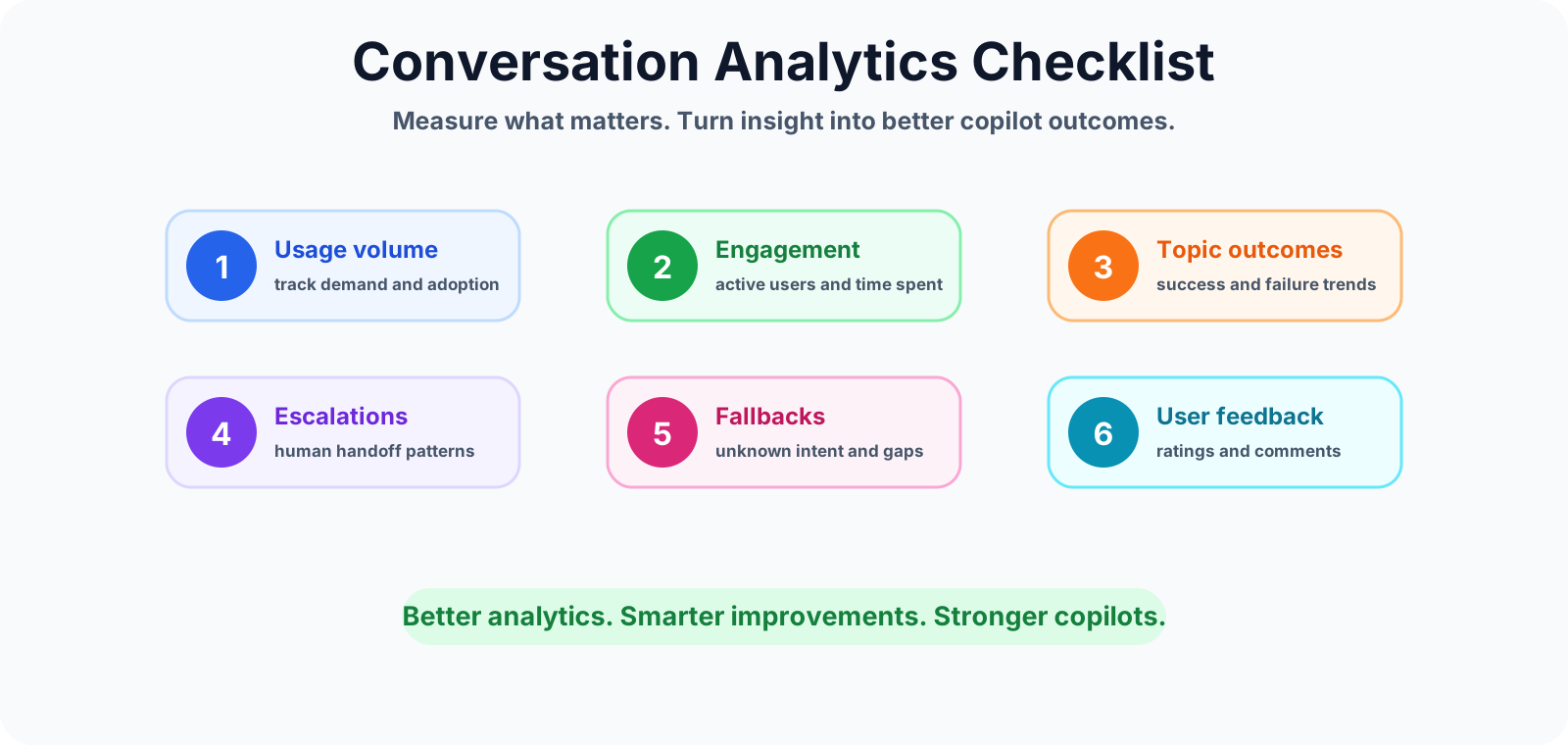
- Start with a clear analytics question before reviewing dashboards.
- Track conversation volume, but compare it with outcomes.
- Review active users, returning users, and time spent.
- Identify high-usage topics and weak-performing topics.
- Measure successful outcomes, unresolved conversations, and abandonment.
- Watch escalation trends and confirm handoff quality.
- Group fallback phrases by user intent.
- Review user feedback and transcript examples together.
- Create a prioritized improvement backlog.
- Measure again after each important change.
Best practices
- Review analytics weekly after launch and daily during pilot periods.
- Define what success means before comparing metrics.
- Focus on outcomes, not only activity.
- Use fallback phrases to improve triggers, routing, and knowledge coverage.
- Connect analytics findings to a visible improvement backlog.
- Keep business owners involved for high-impact topics.
Summary
Conversation analytics turns Copilot Studio from a published chatbot into a managed product. It helps you understand user intent, measure outcomes, identify weak topics, reduce avoidable fallbacks, improve escalations, and prove whether changes are helping.
The practical rule is simple: measure what matters, understand why it changed, act with confidence, and measure again. Better analytics leads to smarter improvements and stronger copilots.
Tagged
Conversation Design · Topics · Triggers · Knowledge Sources · AI Agents
Frequently asked questions
What are conversation analytics in Copilot Studio?
Conversation analytics are usage, engagement, topic, outcome, escalation, fallback, and feedback signals that help makers understand how users interact with a Copilot Studio agent.
Which Copilot Studio analytics should I review first?
Start with conversation volume, active users, resolution rate, fallback rate, escalation rate, topic usage, and user feedback. These metrics show adoption, quality, and support impact.
Why does conversation volume not prove copilot success?
High conversation volume can show adoption, but it does not prove users are getting answers. Pair volume with outcomes, fallback trends, escalation trends, and satisfaction feedback.
How can analytics improve Copilot Studio topics?
Analytics can reveal high-use topics, weak trigger phrases, common unanswered questions, failed actions, repeated fallback paths, and topics that need better routing or clearer responses.
How often should I review Copilot Studio analytics?
Review analytics weekly after launch, daily during pilot or go-live, and monthly once the copilot is stable. Keep a backlog of improvements tied to measurable user outcomes.
Sources
- Microsoft Learn: Analytics Summary, Microsoft
- Microsoft Learn: Microsoft Copilot Studio, Microsoft
Have a Microsoft 365 topic idea?
Share article suggestions, community session ideas, corrections, or real-world scenarios for future nextM365 learning notes.
Keep learning Microsoft 365
Explore more practical guides for SharePoint, Power Platform, Copilot Studio, migration, automation, governance, and security.
Continue learning
Related tutorials
Related questions
Related comparisons
Next action