System Topics Explained | Copilot Studio Day 27
Learn what system topics are in Microsoft Copilot Studio, how they support fallback, escalation, goodbye, start over, sign in and error handling.
- Published
- Reading time
- 7 min read
Week 4 · Day 27 of 365 in 365 Days of Copilot Studio — view the full series
What you’ll learn
- What are system topics in Copilot Studio?
- Why system topics matter
- System topics vs custom topics
- Common system topics
- How system topics work with custom topics
On this page (18 sections)
System topics are the built-in topics that help Microsoft Copilot Studio agents manage common conversation moments. They support behaviors such as fallback, escalation, goodbye, start over, sign in, and error handling.
Day 27 of the 365 Days of Microsoft Copilot Studio series explains what system topics are, why they matter, how they are different from custom topics, and how to customize them without breaking the user experience.
This lesson builds on Day 10: Understanding Topics, Day 26: Custom Topics Explained, and Day 14: Conversation Flow Explained.
What are system topics in Copilot Studio?
A system topic is a built-in topic that handles a common part of the conversation experience. These topics are not usually created for one business request. They exist to support the agent when the user starts, asks something unexpected, needs help, wants to restart, needs escalation, or reaches the end of a conversation.
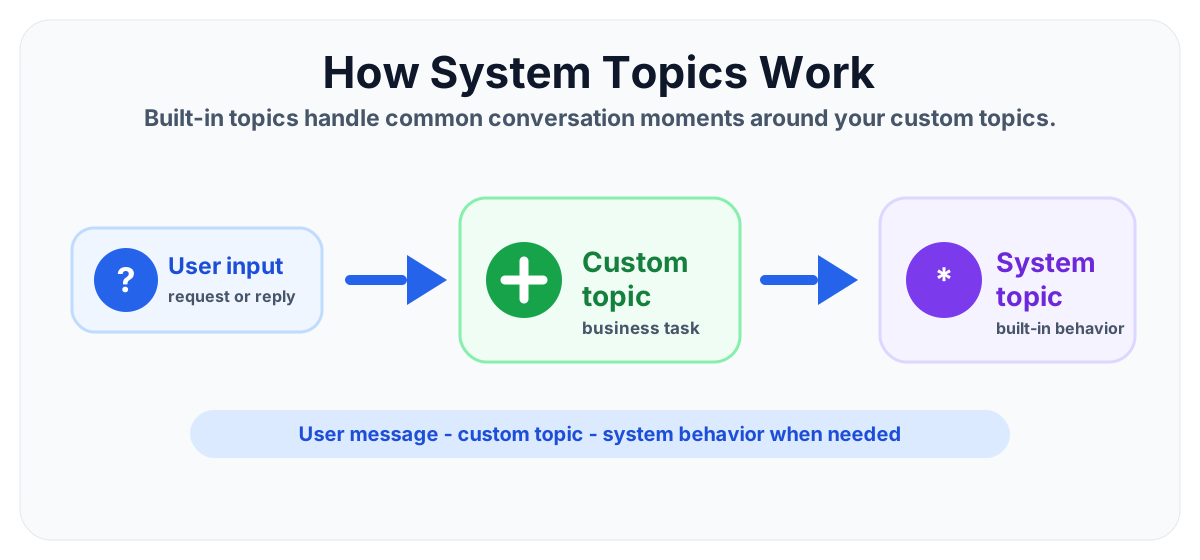
In simple words: custom topics handle your business tasks. System topics handle the conversation behavior around those tasks.
System topics keep the agent usable when the conversation does not follow a perfect path.
Why system topics matter
A user does not only follow the happy path. They may ask unclear questions, enter unexpected wording, request a human, cancel the conversation, start over, or hit an error. System topics help your agent respond to those moments in a controlled way.
- Better user experience: users get clear help instead of confusing dead ends.
- Consistent behavior: fallback, escalation, and endings follow a repeatable pattern.
- Cleaner topic design: custom topics can stay focused on business logic.
- Operational control: makers can align built-in responses with support processes.
- Safer publishing: core conversation paths are easier to test and govern.
System topics vs custom topics
System topics and custom topics both shape the conversation, but they have different responsibilities.
| Area | System topics | Custom topics |
|---|---|---|
| Purpose | Handle built-in conversation behavior | Handle business-specific user goals |
| Examples | Fallback, escalation, goodbye, start over, sign in | Leave request, IT ticket, expense status, onboarding |
| Ownership | Provided by the platform and customized carefully | Created by makers for real scenarios |
| Design goal | Keep the agent stable and helpful | Guide users through a task or answer path |
| Testing focus | Unexpected input, support handoff, endings, errors | Triggers, questions, variables, conditions, actions |
Common system topics
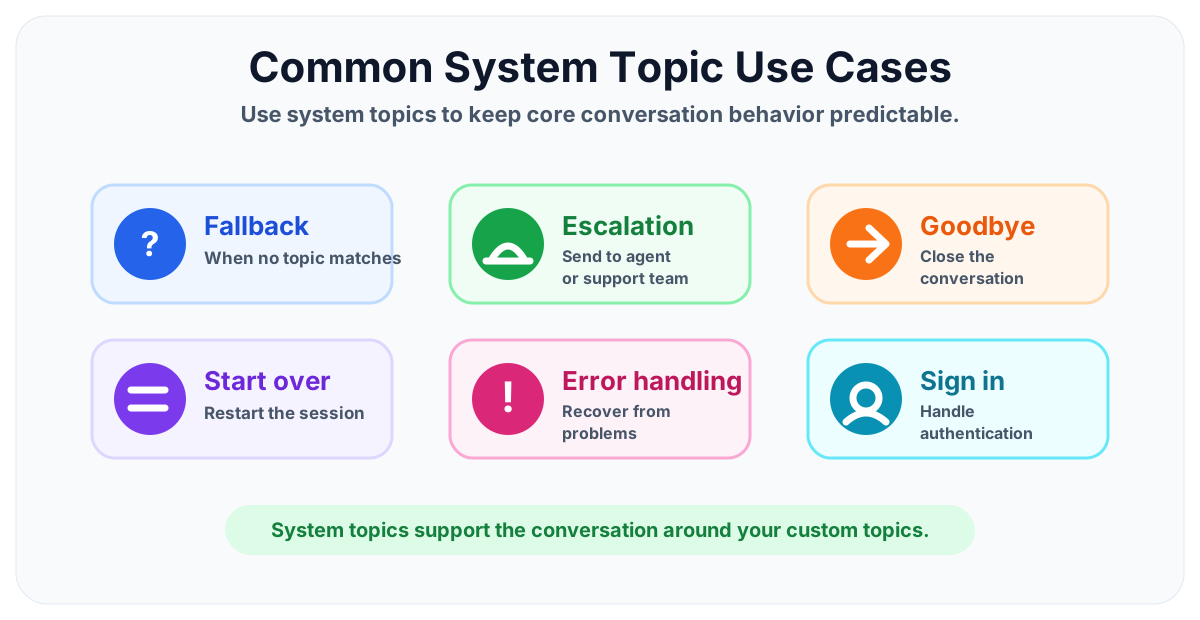
Exact names and available options can vary by agent setup and product updates, but most makers should understand these common system topic patterns.
Fallback topic
The fallback topic runs when the agent cannot confidently match the user's message to a custom topic, system topic, or trusted answer. This is one of the most important system topics because it decides what happens when the agent is unsure.
A good fallback should:
- Tell the user that the agent did not understand clearly.
- Offer examples of what the user can ask.
- Redirect to a help topic when appropriate.
- Escalate after repeated failed attempts if support is available.
Escalation topic
The escalation topic helps move the user from self-service to human support or another support channel. This is useful when the agent cannot solve the issue, when the user asks for a person, or when a business process requires human review.
For example, an IT support copilot can escalate to a help desk process when the user says I need to talk to support or when repeated fallback attempts happen.
Goodbye or end conversation topic
A goodbye or ending system topic helps close the conversation politely. It should confirm that the conversation is complete and make it clear whether the user can start again.
This connects closely with Day 20: End Conversation Node Explained.
Start over topic
The start over topic helps users reset the conversation when they change their mind or the current path is no longer useful. This prevents users from feeling trapped inside the wrong topic.
Use simple wording. The user should understand that starting over may clear the current conversation path and begin again.
Sign in topic
A sign-in or authentication-related system topic supports experiences where the agent needs the user to authenticate before accessing protected data or running certain actions.
Make sign-in guidance clear. Users should know why sign-in is needed and what they can do after signing in.
Error handling topic
Error handling topics help users recover when something goes wrong, such as an action failure, unavailable service, missing permission, or unexpected response. A good error message should be clear and helpful without exposing technical details.
How system topics work with custom topics
System topics do not replace custom topics. They support them. A custom topic might handle a leave request, while system topics handle fallback, restart, escalation, and ending behavior around that request.
Example flow:
- User asks to apply leave.
- A custom leave request topic starts.
- The topic asks questions and stores variables.
- If the user types something unclear, fallback behavior can help recover.
- If the user asks for a person, escalation behavior can take over.
- When the request is complete, the conversation can end cleanly.
This keeps the business topic focused while system topics handle the common conversation edge cases.
When should you customize system topics?
You should customize system topics when the default behavior does not match your support model, tone, or user expectations.
- Fallback wording: update unclear fallback messages with helpful examples.
- Escalation path: connect users to the correct support channel or process.
- Goodbye message: close conversations with clear confirmation and next steps.
- Start over experience: explain what restarting means for the user.
- Error messaging: give users a practical recovery path when an action fails.
Do not over-customize system topics just because they are visible. Start with the user problem, then adjust only what improves the conversation.
Best practices for system topics
- Keep messages short. System topics often appear when users are confused, blocked, or finished.
- Use plain language. Avoid technical phrases such as intent confidence, orchestration, or exception unless your users understand them.
- Give users options. A fallback response can suggest example questions or offer help.
- Plan escalation carefully. Do not promise live support unless the channel and staffing are ready.
- Match your brand tone. System topic wording should sound like the rest of the agent.
- Test unhappy paths. Test unclear wording, cancellations, repeated fallback, action failures, and support handoff.
- Document changes. Keep notes on why each system topic was customized.
Common mistakes to avoid
- Ignoring fallback: users get stuck when the agent cannot understand them.
- Overwriting behavior without testing: system topics affect core conversation paths.
- Using long error messages: users need a next step, not a technical explanation.
- No escalation plan: escalation should connect to a real support path.
- Inconsistent tone: system topic wording should match custom topic wording.
- Not testing restart and goodbye: these paths affect the final user impression.
Example: improving a fallback topic
A weak fallback says: I did not understand.
A better fallback says: I could not match that request yet. You can ask about leave, password reset, SharePoint access, or expense status. Would you like help from support?
The better version does three things:
- It explains the problem simply.
- It gives examples of supported topics.
- It gives the user a path forward.
Testing checklist
Before publishing changes to system topics, test the core conversation paths carefully.
- Type unclear user messages and confirm fallback behavior.
- Ask for a human and confirm escalation behavior.
- Try to restart the conversation from different topics.
- End a successful conversation and check the final response.
- Trigger action failures in a test environment and review error handling.
- Confirm sign-in guidance is clear when authentication is required.
- Check that system topic wording matches the rest of the agent.
System topics and governance
System topics affect the overall reliability and user experience of the agent. Treat them as part of your governance model, especially for production agents used by employees or customers.
- Decide who can edit system topics.
- Review fallback and escalation wording before publishing.
- Keep a record of changes and testing results.
- Confirm support owners for escalation paths.
- Review analytics to find repeated fallback patterns.
If many users trigger fallback with the same wording, create or improve a custom topic. System topic analytics can reveal gaps in your topic design.
Key takeaways
- System topics are built-in conversation support topics. They handle common moments such as fallback, escalation, goodbye, start over, sign in, and errors.
- Custom topics handle business scenarios. Use custom topics for guided tasks such as leave requests, IT help, approvals, and onboarding.
- Fallback matters. A clear fallback keeps users moving when the agent does not understand.
- Escalation needs a real process. Do not add a handoff unless support is ready.
- Test unhappy paths. System topics are most important when the conversation is unclear, blocked, or ending.
System topics are easy to overlook, but they are critical for a professional Copilot Studio experience. When you configure them carefully, your agent feels more complete, helpful, and reliable.
Next in the series: Day 28: Topic Variables Explained.
Related resources
Topics covered
Topics · Conversation Design · AI Agents · Governance
Frequently asked questions
What are system topics in Microsoft Copilot Studio?
System topics are built-in topics that handle common conversation behavior such as fallback, escalation, goodbye, start over, sign in, and error recovery.
How are system topics different from custom topics?
System topics support core agent behavior. Custom topics are created by makers for business-specific scenarios such as HR requests, IT help, approvals, or onboarding.
Can I delete system topics in Copilot Studio?
System topics are built in to the agent experience. Makers should treat them as platform-level topics and customize supported behavior carefully instead of removing core conversation handling.
When should I customize a system topic?
Customize a system topic when the default wording, fallback response, escalation path, sign-in guidance, or conversation ending does not match your organization or user experience.
Why is the fallback system topic important?
The fallback topic helps the agent respond when it cannot match a user message to a topic or knowledge answer. A good fallback keeps users from getting stuck.
Do system topics replace custom topics?
No. System topics support the agent around common moments. Custom topics handle the business process, guided conversation, questions, conditions, and actions.
Sources
- Microsoft Learn: Authoring Create Edit Topics, Microsoft
- Microsoft Learn: Microsoft Copilot Studio, Microsoft
Have a Microsoft 365 topic idea?
Share article suggestions, community session ideas, corrections, or real-world scenarios for future nextM365 learning notes.
Keep learning Microsoft 365
Explore more practical tutorials for SharePoint, Power Platform, Copilot Studio, migration, automation, governance, and security.
Continue learning
Related tutorials
Related questions
Related comparisons