Custom Topics Explained | Copilot Studio Day 26
Learn what custom topics are in Microsoft Copilot Studio, when to use them, how they work, and how to design focused guided conversations.
- Published
- Reading time
- 6 min read
Week 4 · Day 26 of 365 in 365 Days of Copilot Studio — view the full series
What you’ll learn
- What is a custom topic?
- Custom topics vs system topics
- When should you create a custom topic?
- What makes up a custom topic?
- Simple custom topic pattern
On this page (19 sections)
Custom topics are the guided conversations you build in Microsoft Copilot Studio for real business scenarios. They help your copilot handle repeated tasks such as leave requests, IT support, approvals, onboarding, finance questions, and service requests.
Day 26 of the 365 Days of Microsoft Copilot Studio series explains what custom topics are, when to use them, how they work, and how to design topics that are easier for users and makers to manage.
This lesson builds on Day 10: Understanding Topics, Day 25: Trigger Phrases Best Practices, and Day 14: Conversation Flow Explained.
What is a custom topic?
A custom topic is a topic you create to handle a specific user intent or business process. It starts when the user's request matches the topic trigger, then follows the conversation steps you design.
For example, you might create custom topics for:
- Submit a leave request
- Reset a password
- Request SharePoint access
- Check expense status
- Report a Teams issue
- Start new employee onboarding
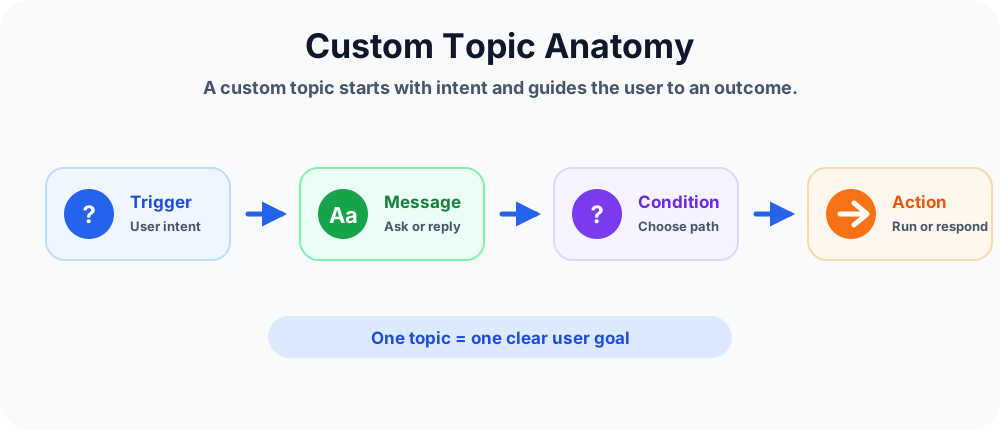
In simple words: a custom topic is a guided conversation for one clear user goal.
Custom topics vs system topics
Copilot Studio agents include both system topics and custom topics.
- System topics: built-in topics that support core behaviors such as fallback, escalation, start over, goodbye, and ending a conversation.
- Custom topics: business-specific topics that makers create for the scenarios their users need.
You normally create custom topics when the copilot must follow a predictable process. System topics handle common platform-level conversation behavior.
When should you create a custom topic?
Create a custom topic when a user request needs structured steps, not only a general answer. If the copilot must ask questions, store information, check rules, call actions, or confirm an outcome, a custom topic is usually a good fit.
Use a custom topic when:
- The same request happens often.
- The user must provide specific details.
- The conversation has a clear start and end.
- The process has business rules or approval paths.
- The copilot needs to call Power Automate, an API, Dataverse, SharePoint, or another system.
What makes up a custom topic?
A custom topic can be simple or advanced, but most useful topics contain a few common building blocks.
Trigger phrases
Trigger phrases help Copilot Studio decide when the custom topic should start. They should sound like real user requests.
Message nodes
Message nodes show information, instructions, confirmations, and next steps.
Question nodes
Question nodes collect user input such as text, number, date, yes/no, choices, email, phone, or URL values.
Variables
Variables store the answers collected in the topic so they can be reused in messages, conditions, redirects, and actions.
Condition nodes
Condition nodes evaluate values and send users down the right path.
Actions and redirects
A Call an Action node runs real work. A Redirect node sends users to another reusable topic.
Simple custom topic pattern
Most beginner custom topics follow this pattern:
- Start with a trigger. The user asks for something in natural language.
- Explain the process. A message tells the user what the copilot can do.
- Ask for required details. Question nodes collect the inputs needed to continue.
- Save answers in variables. The topic stores values for later steps.
- Apply business logic. Conditions decide which path should run.
- Call an action if needed. The topic sends data to Power Automate, Dataverse, SharePoint, or another service.
- Confirm the outcome. The user gets a clear final response.
In short: trigger -> collect details -> apply logic -> run action -> respond.
Example: leave request custom topic
A leave request topic might start when a user says I need leave tomorrow or apply vacation. The topic can then ask for leave type, start date, end date, reason, and manager details.
After collecting those values, the topic can use a condition:
- If leave days are greater than 2, send the request for manager approval.
- If leave days are 2 or fewer, continue with the normal submission path.
Finally, the topic can call an action to create the leave request and show a confirmation message.
Common custom topic use cases
Custom topics are useful wherever users repeat similar requests and need a guided outcome.
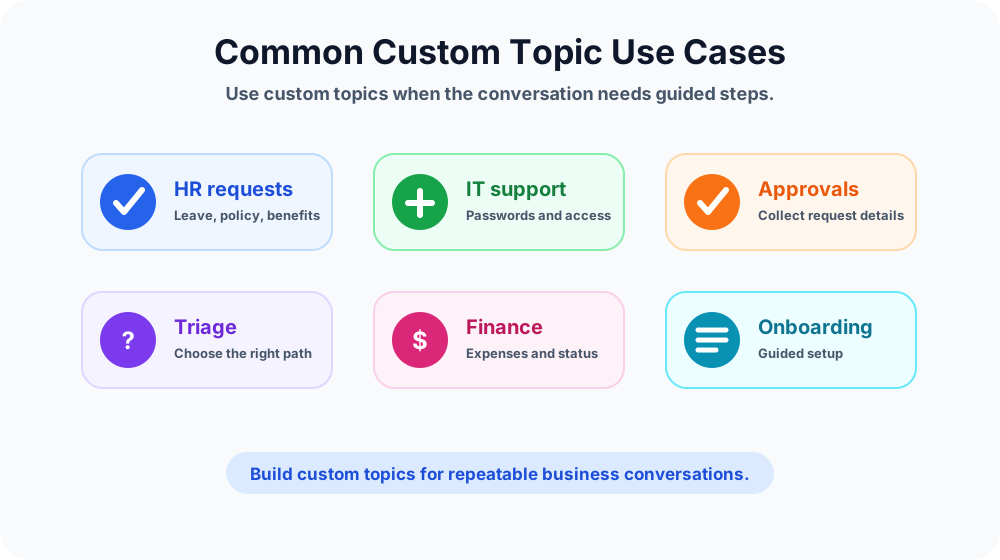
- HR requests: leave, benefits, policy, payroll, and employee letters.
- IT support: passwords, access, devices, Teams issues, Outlook issues, and ticket creation.
- Approvals: expenses, access, procurement, travel, and manager review flows.
- Triage: ask a few questions and redirect users to the correct topic.
- Finance: reimbursement status, invoice help, budget requests, and purchase checks.
- Onboarding: new employee setup, account requests, orientation steps, and policy guidance.
How to design a good custom topic
A good custom topic is focused, readable, and easy to test. It should not try to solve every problem in one large topic.
- Start with one user goal. Define what the topic must help the user complete.
- Write realistic trigger phrases. Use language users actually type.
- Keep questions clear. Ask only for information the process needs.
- Name variables properly. Use names that explain the value, such as Leave Days or Issue Type.
- Use conditions carefully. Keep branch logic simple and readable.
- Use redirects for reusable steps. Do not copy the same logic across many topics.
- End with a clear response. Tell the user what happened and what comes next.
Keep custom topics small
Large topics are harder to understand, test, and maintain. If a topic has too many paths, split it into smaller topics and connect them with redirects.
For example, an IT Support topic can start as a triage topic. It asks what the user needs help with, then redirects to smaller topics such as Password Reset, Teams Issue, Outlook Issue, or Device Request.
Small focused topics are easier to improve than one large topic with too many branches.
Common mistakes to avoid
- Too many intents in one topic: one topic should not handle unrelated requests.
- Weak trigger phrases: vague phrases can start the wrong topic.
- Too much text before asking a question: users want progress, not long instructions.
- No variable naming discipline: unclear variable names make logic hard to maintain.
- Untested branches: every condition path must be tested.
- No final confirmation: users should know whether the request was completed, submitted, or escalated.
Testing checklist
Before publishing a custom topic, test the full conversation from different user angles.
- Test each trigger phrase and common phrase variation.
- Test every question and supported response type.
- Test empty, invalid, and unexpected answers.
- Test all TRUE and FALSE condition paths.
- Test redirects to other topics.
- Test actions with realistic input values.
- Test the final message so the user has a clear outcome.
Custom topics and knowledge sources
Custom topics and knowledge sources work well together, but they solve different problems.
- Use knowledge when the user needs an answer from trusted content.
- Use a custom topic when the user needs guided steps or a business process.
For example, a policy question can be answered from knowledge. A leave request should usually be a custom topic because it must collect details and submit a request.
Key takeaways
- Custom topics handle business scenarios. They guide users through repeatable conversations.
- One topic should have one clear goal. Focused topics are easier to trigger, test, and maintain.
- Trigger phrases start the topic. Good phrases help the right topic start.
- Nodes shape the conversation. Messages, questions, variables, conditions, actions, and redirects each have a purpose.
- Testing matters. Test every trigger, question, condition, redirect, action, and ending.
Custom topics are where Copilot Studio becomes practical for business users. When you design them clearly, users get faster answers and smoother self-service experiences.
Next in the series: Day 27: System Topics Explained.
Related resources
Topics covered
Topics · Conversation Design · AI Agents · Workflow Automation
Frequently asked questions
What is a custom topic in Microsoft Copilot Studio?
A custom topic is a conversation flow you create for a specific user intent or business task, such as leave requests, IT support, approvals, or onboarding.
How is a custom topic different from a system topic?
System topics support built-in behaviors such as fallback, escalation, and ending conversations. Custom topics are created by makers for business-specific conversations.
When should I create a custom topic?
Create a custom topic when a repeated user request needs guided steps, questions, conditions, actions, or a predictable business outcome.
What does a custom topic include?
A custom topic can include trigger phrases, messages, questions, variables, conditions, redirects, action calls, and final responses.
Should one custom topic handle many requests?
No. Keep each custom topic focused on one clear user goal. If a topic becomes too large, split it into smaller topics and use redirects.
How do I test a custom topic?
Test the trigger phrases, every question, every condition path, redirects, action outputs, fallback behavior, and the final user response before publishing.
Sources
- Microsoft Learn: Authoring Create Edit Topics, Microsoft
- Microsoft Learn: Microsoft Copilot Studio, Microsoft
Have a Microsoft 365 topic idea?
Share article suggestions, community session ideas, corrections, or real-world scenarios for future nextM365 learning notes.
Keep learning Microsoft 365
Explore more practical tutorials for SharePoint, Power Platform, Copilot Studio, migration, automation, governance, and security.
Continue learning
Related tutorials
Related questions
Related comparisons